
TotalAgility - Box Connectorv2.0
 Download
 TotalAgility - Box Connectorv2.0 Overview

Features
Seamless bi-directional Box integration
Directly connects Tungsten TotalAgility workflows with Box for both secure document upload and automated file discovery, classification, extraction, and metadata write-back.
Automated file discovery and processing
Crawls configured Box folder trees, identifies unprocessed files, and queues them for TotalAgility AI-powered classification and data extraction. Already processed files are automatically skipped using a TAProcessedDate marker, making runs fully resumable.
Intuitive configuration interface
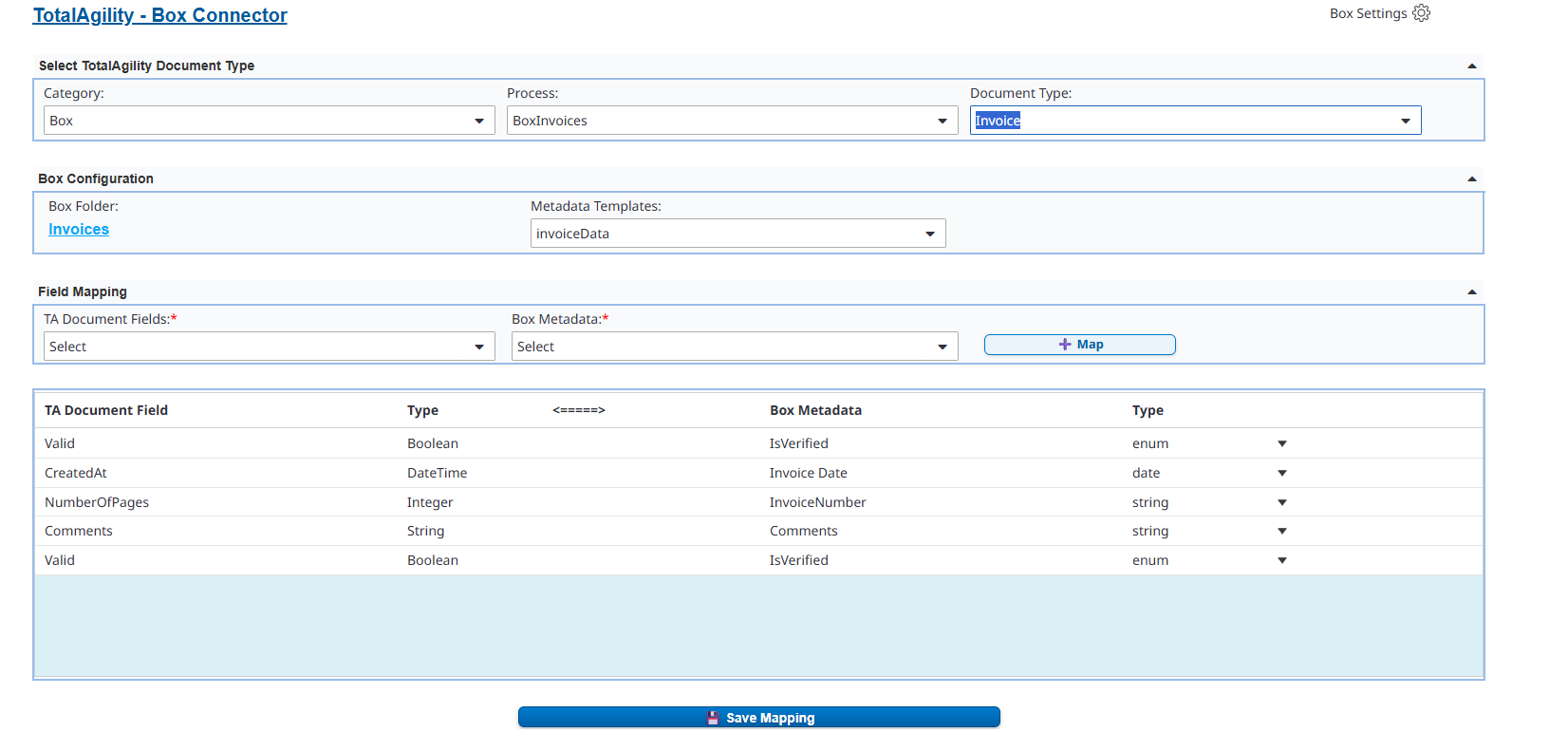
Easily configure Box settings, folders, and field-to-metadata mappings within TotalAgility. Supports three metadata destinations: existing Box templates, new templates created on demand, and global properties for schema-free storage.
Dynamic metadata mapping
Automatically applies predefined mappings between TotalAgility fields and Box metadata during both upload and metadata write-back. Supports string, date, float, and enum field types with empty value handling to prevent API errors.
Secure configuration storage
Connector settings and mappings are securely stored in TotalAgility Server Variables for controlled, repeatable use across runs.
Automated document export
Transfers captured or workflow-generated documents from TotalAgility to Box with minimal manual intervention, ensuring consistency and traceability.
As-User support for enterprise accounts
Enables document operations under specific Box user contexts, supporting enterprise-level access control and audit trails.
Minimum permissions model
Operates with App Access Only using Client Credentials Grant. The service account is added as a collaborator on specific folders, with no enterprise-wide access required.
Versioning and folder management
Uploads new document versions or dynamically creates folders as needed, maintaining organized and traceable document structures.
Benefits
- Automates both the export of documents from TotalAgility to Box and the discovery and AI-powered processing of files already in Box, eliminating manual effort in both directions.
- Seamlessly bridges process automation in TotalAgility with cloud content management in Box through a fully bi-directional integration.
- Ensures field-level consistency by dynamically mapping TotalAgility extracted data to Box metadata templates, global properties, or newly created templates on demand.
- Centralizes documents within Box with enriched AI-extracted metadata, providing a single source of truth with versioning, metadata traceability, and TAProcessedDate stamping for audit purposes.
- Delivers a ready-to-use connector with an intuitive configuration UI, no custom code or API scripting required.
- Reduces operational risk with a minimum permissions model using Client Credentials Grant and App Access Only, keeping the service account scoped to only the folders it needs.
-
- Makes batch processing resumable across runs, already processed files are automatically skipped, so interrupted jobs pick up exactly where they left off.
Technical Details
Inputs
- Client ID - Box application client identifier from the Box Developer Console.
- Client Secret - Secret key associated with the Box application for CCG authentication.
- BOX_SUBJECTTYPE - Subject type for CCG token request (enterprise).
- BOX_SUBJECTID - Enterprise ID from the Box App Details panel.
- As-User ID (optional) - Box user ID for operations performed in As-User enterprise context. Requires "Make API calls using the as-user header" enabled in Developer Console and App + Enterprise Access.
- Root Folder ID - The Box root folder ID for discovery (BOX_ROOTFOLDERID). The service account must be added as an Editor collaborator on this folder.
- Folder ID - Target Box folder where documents will be uploaded in the v1.0 upload flow.
- MaxFilesToProcess - Maximum number of files to discover and process per run in the v2.0 discovery flow.
- TotalAgility SDK URL - URL for connecting to the TotalAgility SDK service.
- Session ID - Active TotalAgility session identifier.
- Document ID (Document.InstanceID) - The TotalAgility document to be uploaded (v1.0 upload flow).
Outputs
The Box Connector produces one or more of the following outputs after execution within a TotalAgility workflow:
- File Upload Confirmation - Indicates that the document has been successfully uploaded to the configured Box folder (v1.0 upload flow).
- Box File ID - Unique identifier of the uploaded file, used for tracking and subsequent operations.
- Discovered File List - JSON list of eligible Box files returned by DiscoverEligibleFiles, including file ID, file name, folder path, and extension for each file (v2.0 discovery flow).
- Discovery Status Message - Plain text message returned via the message out parameter indicating the number of files found, or the actual Box API error if discovery failed.
- Updated Metadata - Extracted TotalAgility field values written back to the Box file using the configured mapping, to an enterprise metadata template, a newly created template, or global properties.
- TAProcessedDate - Timestamp stamped on each successfully processed Box file in global/properties, serving as the idempotency marker for subsequent discovery runs.
- New Template Key - Returned by CreateBoxMetadataTemplate when a new Box enterprise metadata template is created on demand, used to store the correct key in the mapping configuration.
- New Folder ID (if applicable) - Returned when a new folder is created dynamically during export (v1.0 upload flow).
- Version Information - Generated when an existing file is updated, ensuring full version history in Box.
- Success or Error Response - Structured result object returned to TotalAgility summarizing the operation result, including IsError, ErrorMessage, and where applicable the actual Box API error response body.
Geographic Availability
Additional Information
The Box Connector is designed to simplify and accelerate enterprise document management by bridging Tungsten TotalAgility's process automation with Box's secure cloud content platform. Version 2.0 extends the connector into a fully bi-directional integration, enabling organizations to not only push documents into Box but also automatically discover, classify, extract, and enrich documents already stored in Box using TotalAgility's AI capabilities.
All connector configurations, including authentication details, folder settings, and metadata mappings, are stored securely within TotalAgility and reused automatically across runs. The connector supports enterprise features such as version control, As-User mode, dynamic folder creation, and configurable batch processing, ensuring flexibility across diverse business scenarios.
Authentication uses Client Credentials Grant with App Access Only, requiring no user login, no refresh token management, and no manual re-authorization. The service account is scoped to only the folders it has been explicitly invited to, making the connector suitable for security-conscious enterprise deployments.
The TAProcessedDate marker ensures each file is processed exactly once, making discovery runs safe to interrupt and restart without risk of duplication. Combined with the configurable batch size, this allows organizations to process large document repositories incrementally at their own pace.
This connector is ideal for organizations seeking to centralize document storage, enrich Box content with AI-extracted metadata, maintain compliance, and improve collaboration through seamless bi-directional integration between workflow automation and cloud content management.
FAQ
Does this require Box enterprise admin access to set up?
No. The connector uses App Access Only with Client Credentials Grant — the service account is added as a collaborator on specific folders rather than requiring enterprise-wide admin rights.
What happens if a discovery run is interrupted partway through?
Nothing is lost or duplicated. Each successfully processed file is stamped with a TAProcessedDate marker, so if a run stops, the next run picks up only unprocessed files and skips everything already completed.
Can I use Box metadata templates I've already created, or does this require new ones?
Both are supported. You can map extracted TotalAgility fields to existing Box templates, have the connector create a new template on demand, or write to Box global properties if you don't want a formal template at all.
Does this support uploading new versions of an existing file, or only new files?
Both. If a file already exists in the target Box location, the connector uploads it as a new version, preserving Box's version history rather than creating a duplicate.
Is this a one-way integration (TotalAgility to Box) or bi-directional?
Bi-directional as of v2.0. It supports pushing documents from TotalAgility to Box, and discovering, classifying, and extracting data from files already sitting in Box.


