
Power PDF Connector for Zoho WorkDrive
 Download
 Power PDF Connector for Zoho WorkDrive Overview
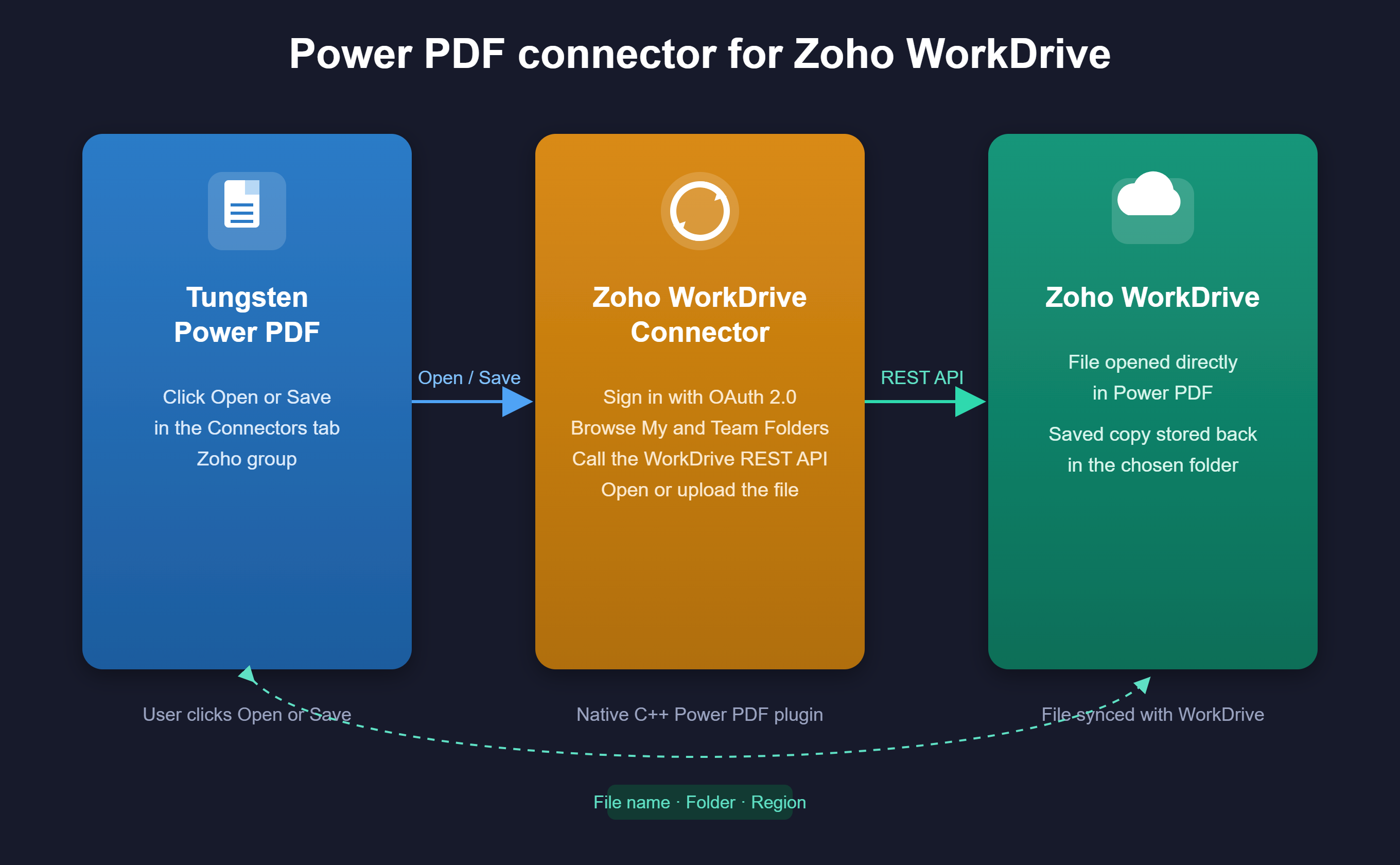
Features
* Open and save PDF documents directly with Zoho WorkDrive with a single click from the Power PDF ribbon
* Uses the Zoho WorkDrive REST API to download files for Open and upload edited documents for Save
* OAuth 2.0 sign in through the user's default browser, with support for all five Zoho data centers: US, EU, IN, AU, and CN
* Dedicated Configure ribbon button for entering Client ID, Client Secret, and Region, no need to go into File Options
* Automatic overwrite confirmation when saving to a file name that already exists in the destination folder
* Client ID, Client Secret, and Region are entered once and reused for every Open and Save afterward
* Refresh token reuse across sessions, no need to sign in again until access is revoked or the connection is reconfigured
* Secure credential storage: Client Secret and refresh token are encrypted in the Windows registry using DPAPI
* Folder browser shows both My Folders and Team Folders, matching the Zoho WorkDrive web interface
* One click installer auto detects the Power PDF install path and deploys the plugin with no manual file copying or registry edits
* Compatible with Tungsten Power PDF 2025.3, Fix Pack 8 or later (64-bit)
Benefits
* Instant Access: Eliminate manual downloads and uploads, open and save PDFs directly between Power PDF and Zoho WorkDrive in one click
* Zero Context Switching: Users stay in Power PDF throughout, sign in and file transfer happen without leaving the application
* Familiar Folder Structure: My Folders and Team Folders appear exactly as they do in the Zoho WorkDrive web app, so there is nothing new to learn
* Flexible Configuration: Update your Client ID, Client Secret, or Region at any time via the dedicated Configure button, no reinstallation required
* Secure by Design: Client Secret and refresh token encrypted using Windows DPAPI, sign in handled by your default browser, nothing stored beyond your local machine and your Zoho account
* Simple Deployment: One click installer auto detects the Power PDF install path, no manual file copying, DLL registration, or registry edits required
* Shared Setup: The OAuth client is created once for the whole organization, only the final sign in step is personal to each user
* Clear Confirmation: The document tab shows the real file name with a Zoho marker, and Save warns before overwriting an existing file, so users always know what happened
Technical Details
Inputs
* Open PDF document - the currently active file in Power PDF, uploaded to the selected Zoho WorkDrive folder when Save is used
* Client ID and Client Secret - the OAuth application credentials from the Zoho API Console, entered once in Configure and reused for every session
* Region - the Zoho data center your account belongs to (US, EU, IN, AU, or CN), used to select the correct Zoho API endpoints
* Zoho sign in - your Zoho account credentials, entered directly on Zoho's own sign in page in the browser, never seen by Power PDF
* Destination folder and file name - the Zoho WorkDrive folder and file name selected in the Open or Save dialog
Outputs
* Opened document - the downloaded file, opened as a new document in Power PDF with its real name and a Zoho marker in the tab
* Destination folder - the Zoho WorkDrive folder the file was saved to, visible immediately in Zoho WorkDrive
* File name - the name the document was saved under in Zoho WorkDrive, defaulting to the open document's real name
* Last modified timestamp - recorded by Zoho WorkDrive itself on every save, visible in the WorkDrive web app
* Operation status - success confirmation or a clear error message shown immediately in Power PDF after every Open or Save
Geographic Availability
Additional Information
Bring the convenience of Zoho WorkDrive cloud storage directly into Tungsten Power PDF. With this connector, knowledge workers can open and save PDF documents to their Zoho WorkDrive without ever leaving their PDF workflow, eliminating manual downloads, uploads, and file management overhead.
Once configured, the connector handles sign in, folder browsing, and file transfer in a single click. It works with any folder a user has access to in Zoho WorkDrive, including shared Team Folders, making it immediately useful for teams collaborating on contracts, reports, forms, and any other PDF based documents stored in the cloud.
Built as a native plugin for Tungsten Power PDF and compatible with Power PDF 2025.3, Fix Pack 8 or later, the connector deploys with a single one click installer, no manual file copying, DLL registration, or registry edits required. Credentials are secured using Windows DPAPI encryption, and all communication goes directly to Zoho's own WorkDrive API, no third party services involved.
Whether you are an IT administrator rolling out cloud document access across the organization, a business user who keeps PDFs in Zoho WorkDrive, or a solutions architect connecting Power PDF to your existing cloud storage, this connector delivers immediate value with minimal setup.


