
Multi Export Connector
 Download
 Multi Export Connector Overview

Features
- Use an index field to select the export dynamically
- Create a more advanced workflow and export to another export connector
- Per destination you can export:
* All documents or a specific range of documents. For example specifying 1-3 means document 1 to 3. Or specifying -1 means the last document of each batch.
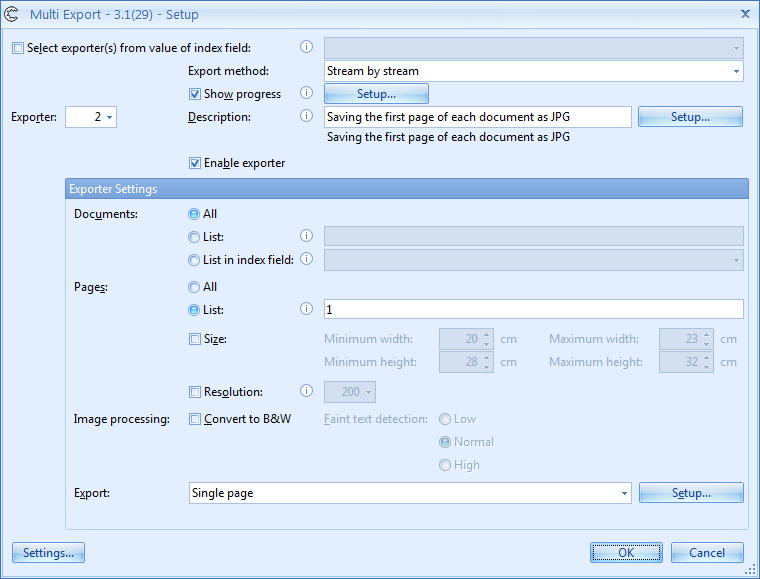
* Per document you can export all pages or specific pages based on their page number.
For example, specifying 1-3 means page 1 to 3 of each document. Or specifying -1 means the last page of each document.
For example, in the screenshot, exporter 2 exports the first page of each document to the Single page connector in JPG format.
* Specific pages based on their size or resolution.
* A color version of all or particular pages
* A black & white version of all or particular pages
Benefits
Exporting a multi-stream of images in both color and black & white is often required for processing them with OCR, OMR or Bar Code recognition. Those systems require good black & white TIF images.
However, the images also need to be stored as a color, searchable PDF in a document management system for later reference.
Another example: Documents should be emailed as compact black & white PDFs and color PDF files should be stored in Microsoft SharePoint.
Each stream can be output as PDF, PDF/A, searchable and/or super compressed or TIFF.
Technical Details
Inputs
Scan documents with Express
Outputs
Export documents and or index files to the specified folder(s) and/or combine with other Express Export Connectors to manage your scanned documents and data with any DMS of choice.
Geographic Availability
Additional Information
Most of our products work in demo mode when they are not activated. In demo mode, a demo seal will be stamped in all exported images.
If you want to use the product in full production mode without these demo stamps, you can request a trial license.



